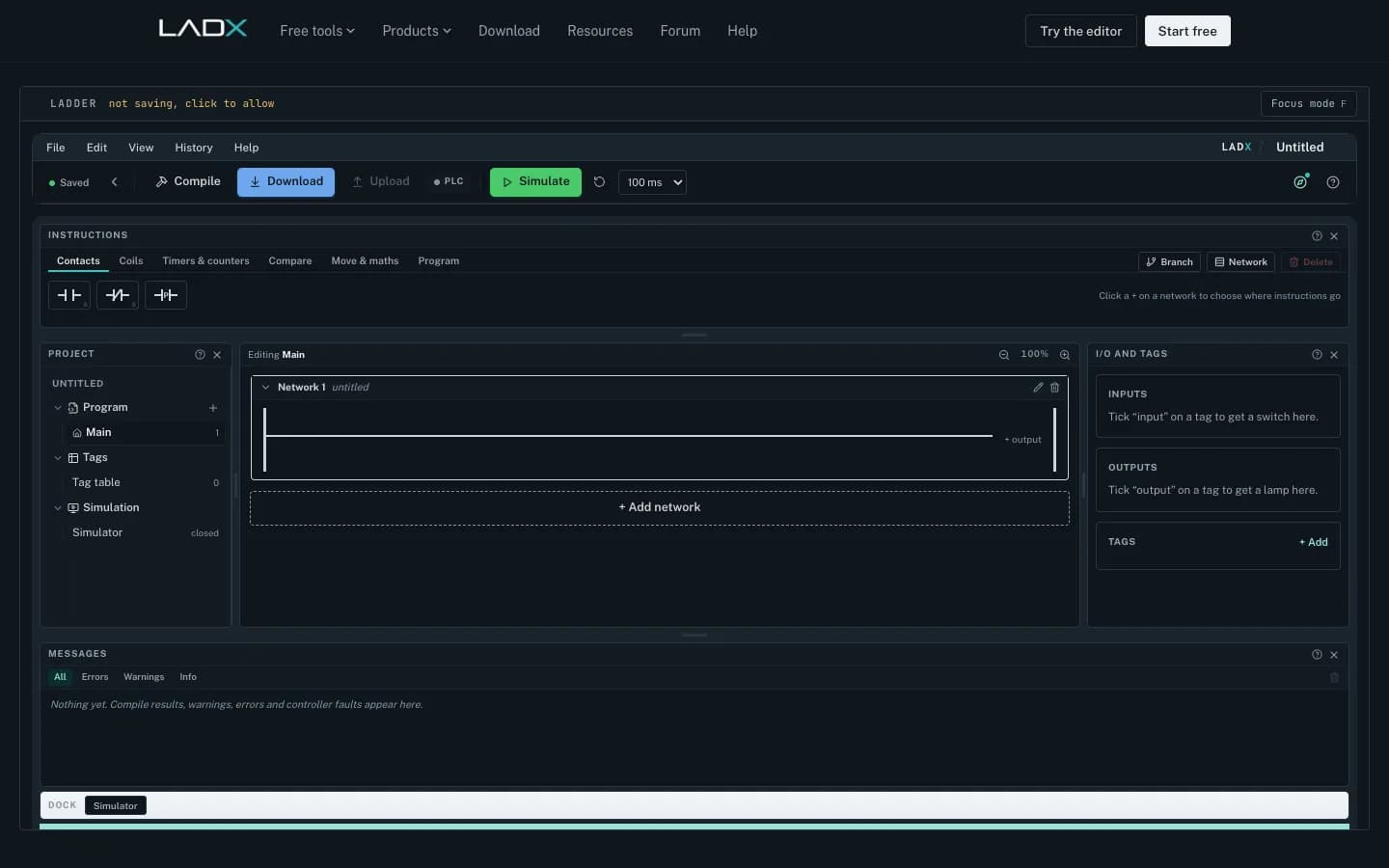
If you want a free ladder logic simulator that behaves like a real PLC, LADX Ladder runs in a web browser with no account, no licence and no installation, and it keeps an output image, edge memory and millisecond timers the way a controller does. It is built by LADX, the Wartens group's AI product for controls teams, and it saves your programs to the browser you are using.
That matters for apprentices and maintenance engineers in the UK, because the usual way to practise is a vendor IDE licence plus a trainer rig, and most people only get those during college hours. This guide explains what the simulator does, five exercises worth doing on it, and the limits you should know before relying on it.
Why a free ladder logic simulator matters for UK apprentices
The Level 4 automation and controls engineering technician standard (ST0662) runs for a typical 48 months and expects apprentices to configure and program a wide variety of PLCs and robots. That is a lot of programming to learn when the only controller you can touch is in a college workshop two days a week.
Practice time is the bottleneck, not theory. A learner who has written fifty seal-in rungs and watched them fail in interesting ways will fault-find a real conveyor faster than one who has read about them. A browser simulator gives that repetition on a laptop at home, on a works PC during a quiet shift, or on a college machine where installing software needs IT approval.
What makes a simulator worth using: the scan
Many teaching simulators solve rungs like a list of equations, so a coil on rung five appears to reach a contact on rung two instantly. Real controllers do not work like that. LADX's own explainer on what happens in one PLC scan sets out the cycle: copy the inputs, solve top to bottom, write the outputs, housekeeping, repeat, typically in one to twenty milliseconds.
| Behaviour | Equation-style simulator | LADX Ladder |
|---|---|---|
| Coil read by an earlier rung | Changes instantly | Seen on the next scan |
| Button held down for a count | May count every scan | Counts once (edge memory per instruction) |
| Timers | Often count scans | Run on elapsed milliseconds |
| Physical outputs | Change mid-solve | Written from the output image at the end |
Those three details, rung order, edges and timing, are where most beginner bugs live. If the simulator gets them wrong, it quietly teaches the wrong model and the learner finds out on a live machine.
What you get in LADX Ladder
- Twenty-three instructions that cover most real work: XIC, XIO, OTE, OTL, OTU, ONS, TON, TOF, CTU, CTD, RES, the six comparisons, MOV, four arithmetic blocks and JSR to call another routine.
- Addressable timer and counter members such as .DN, .TT, .EN, .ACC and .PRE, so you can build logic on a timer's done bit exactly as you would on site.
- Starter programs that run as they are, including a seal-in motor start and a ten-second conveyor. Each opens as a copy, so taking it apart does not spoil it for the next learner.
- Tags with addresses and device types, so the simulator can show a panel of switches and lamps rather than a grid of bits.
- An AI box that turns a plain-language description into rungs using your existing tags. Chat needs a free account. Without a key of your own it runs on free models through LADX's shared account, rate limited per account, and you can connect your own key to use paid models.
The mnemonics follow the Allen-Bradley style. If you are training on Siemens TIA Portal, read XIC as a normally open contact and XIO as a normally closed contact; the logic is identical even though the vocabulary differs.
Five exercises worth doing
- Seal-in start and stop. Build a start/stop circuit with a normally closed stop button and a guard switch. Then delete the stop from the latch leg and watch the motor refuse to stop. LADX notes this missing-stop seal-in is the mistake generated ladder makes most often, and it is common in human-written logic too.
- Edge counting. Count boxes on a conveyor with CTU and a photo-eye. Hold the input on and confirm it counts once. Then add ONS somewhere it is not needed and work out why the count changes.
- Timed conveyor. Run a conveyor for ten seconds after a start pulse with TON, then add a fault input that stops it and resets the timer.
- Rung order. Write a coil on rung three and read it on rung one. Step through scans and explain the one-scan delay in your own words.
- Tank level alarm. Use MOV and a comparison to raise a high-level alarm from an analogue value, with a separate reset. Water apprentices will recognise the pattern from pumping stations.
What it does not do
LADX lists its own limits on the Ladder product page, and they are worth repeating. It is a teaching and verification simulator, not a certification tool, and it does not replace commissioning. It never connects to a physical controller, by design. There is no retentive timer, so an RTO has to be built from a counter or a latch. It draws ladder only; Structured Text is read and written by LADX Convert but not drawn in the editor.
It is also not a substitute for learning the vendor IDE your employer uses. Hardware configuration, addressing, online edits and diagnostics in TIA Portal or Studio 5000 still need time on the real software. Think of the browser simulator as the place to get the logic habits right, and the vendor tools as the place to learn the platform.
Scanning the Ladder Logic Program: PLC Explained
Engineering Technology Simulation Learning Videos
This video is hosted on YouTube. Playing it loads content from Google, which may set cookies.
Watch on YouTubeWhere it fits with formal PLC training
Ladder diagram is one of the languages defined in IEC 61131-3, so the habits transfer across brands. We use free tools like this for practice between structured sessions, not instead of them. Our edWartens PLC and SCADA courses cover Siemens and Allen-Bradley platforms with an instructor, and learners who want hands-on fault-finding without a rig can use the VR PLC and SCADA lab.
If you are an employer planning a programme for several technicians, our guide to PLC training courses in the UK explains how to combine classroom time, practice and assessment.
Next step
Open the simulator and build the five exercises above in an evening. If you want a structured route from there, or a course for a team of maintenance engineers, contact our Milton Keynes team with the platforms you run and the number of learners, and we will come back with a course plan.