A useful Studio 5000 AI assistant does two things: it produces rung logic that Logix Designer can actually import, and it tells you plainly what it could not carry across. LADX Convert, the conversion tool in the LADX workbench, writes a ladder program out as Rockwell neutral text (the instruction-mnemonic rung format Logix uses inside its text exports) alongside IEC 61131-3 Structured Text, Siemens SCL and PLCopen XML, with a report on every element. It does not read .ACD projects or touch a controller, and this article explains why that matters on a real U.S. job.
What Studio 5000 users want from an AI assistant
Talk to controls engineers at a plant or an OEM and the wish list is short. Explain the routine somebody else wrote in 2014. Draft the boring rungs: motor starters, permissives, alarm bits. And, more and more often, take logic that already exists on a Siemens or CODESYS skid and get it into a CompactLogix without retyping 300 rungs by hand.
Rockwell is answering the first two inside its own tools. FactoryTalk Design Studio advertises an integrated generative AI copilot, with the promise to "generate and troubleshoot code just by asking" (Rockwell Automation). That is a sensible product for an all-Rockwell shop. It is less help for the integrator who touches a Siemens line on Monday and a Rockwell cell on Wednesday, because each vendor assistant is built to write its own platform. That gap is the one LADX was built for: it is vendor-neutral, and its AI output is checked before it reaches the canvas, with the problems listed beside the answer (ladx.ai).
How LADX Convert works
LADX Convert does not contain a Siemens-to-Rockwell converter, and that is the point. Every program is held in one intermediate representation built on the PLCopen model, and each output format is written from it. Four targets exist today: IEC 61131-3 Structured Text, Siemens SCL, Rockwell neutral text and PLCopen XML (LADX Convert). Because they are all written from the same source, the four outputs cannot drift apart from each other.
The intermediate form matters because PLCopen XML is the closest thing the industry has to a portable file. PLCopen's TC6 committee defined it so that tools could exchange both the text and the graphical layout of a program, and in 2019 it became IEC 61131-10 (PLCopen XML exchange, IEC 61131-10:2019).
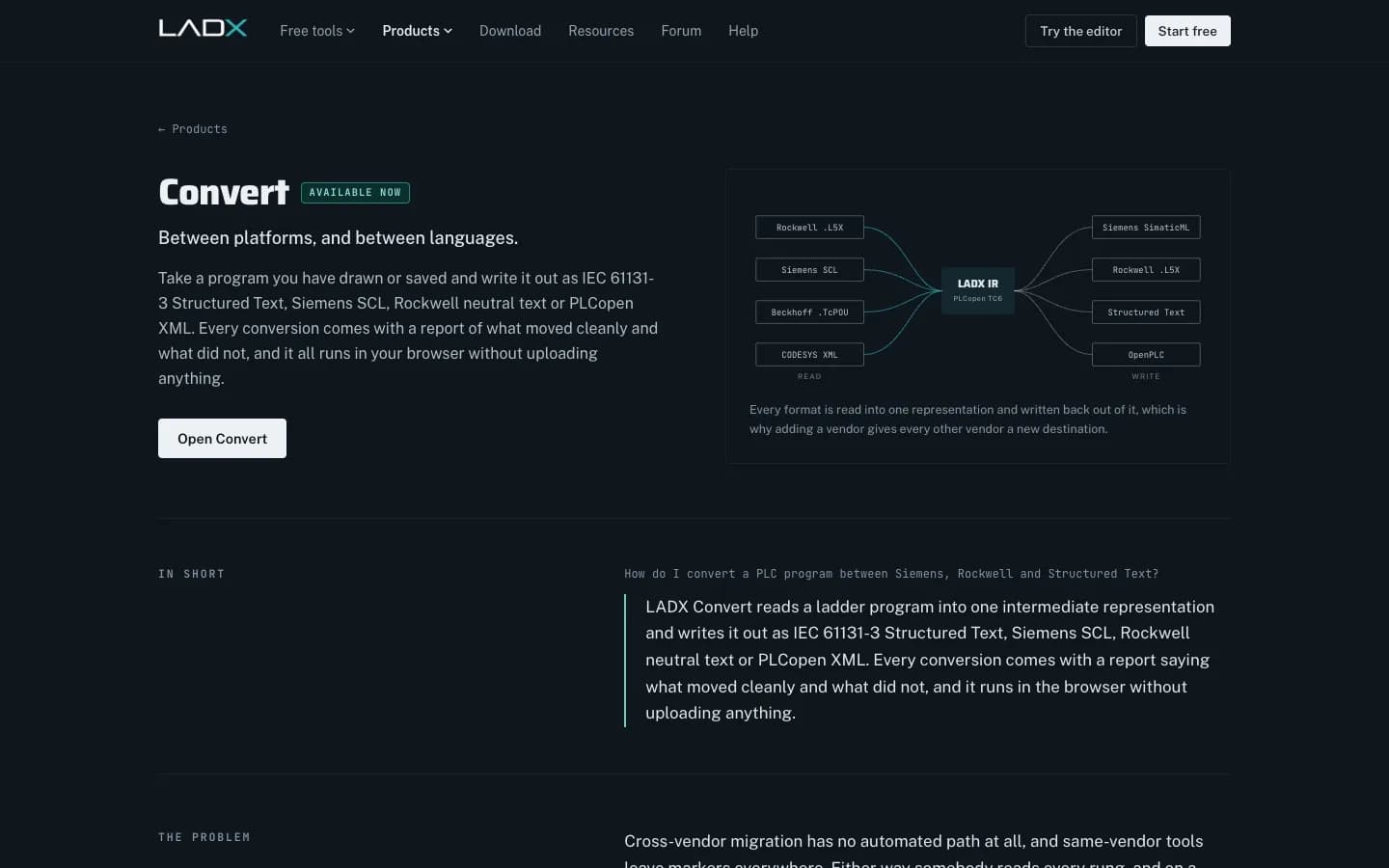
Every conversion comes with a report that marks each element as converted cleanly, converted with a semantic difference worth reading, or needing a decision. Anything that cannot be mapped stays as an annotated placeholder rather than being dropped or quietly reinterpreted. The conversion also runs in the browser, so the program is not uploaded anywhere. On U.S. projects that last point is often the deciding one, because the code belongs to the end user and the NDA says it does not go to a cloud service.
Getting converted rungs into Logix Designer
Logix Designer already has the door you need. Its import/export feature handles full projects as .L5K (ASCII) or .L5X (XML), and it can import selected components as .L5X, including programs, routines in any language, ladder rungs, user-defined data types and Add-On Instructions (Rockwell Automation, Studio 5000 Logix Designer help). The workflow we recommend for converted logic is deliberately boring:
- Convert the source program and read the whole report before opening Studio 5000. Every "needs a decision" line becomes a ticket.
- Create the tags and UDTs in a scratch Logix project first, named to your plant standard, so imported rungs land on real tags.
- Bring the rung text in as a new routine in that scratch project, never straight into the production file.
- Verify the routine, then fix every flagged difference by hand: timer presets, data types, one-shots and addressing.
- Run the routine in emulation against your test cases before it goes near the master project.
| Element | What usually happens | What to check |
|---|---|---|
| Contacts, coils, latches | Converts cleanly | Tag names match your standard |
| Timers | Converts with a difference | Preset units and data type on the target |
| Edge detection and one-shots | Converts with a difference | One-shot storage bits are unique |
| Addressing (%I0.0 vs tags) | Needs a decision | Map to Logix tags or aliases |
| Bridged rungs | Refused and preserved | Redraw as series and parallel logic |
The reason for the caution is simple. Logic converts, but the things around it often do not. Instruction behavior, timer semantics, data types and addressing differ enough between Siemens and Rockwell that a fully automatic conversion would compile and then behave differently. LADX's own documentation says as much, and we agree with it.
Where LADX Convert stops today
Honest limits save more time than optimistic features, so here they are in one place:
- Reading vendor projects back in is not built yet. LADX says this openly: the import half of the picture is still to come.
- Whole-project formats need the vendor's tool. .ACD files are not read directly and need your own licensed Studio 5000 installation.
- Bridged rungs are refused. A wire crossing between parallel branches has no series/parallel form, so it is kept and flagged, not approximated.
- Nothing is downloaded to a controller. LADX never writes to a live PLC, by design.
- It converts the program, not the panel. I/O configuration, module definitions, produced/consumed tags and safety tasks stay in Studio 5000.
PLCopen Introduction
PLCopen
This video is hosted on YouTube. Playing it loads content from Google, which may set cookies.
Watch on YouTubeHow it fits a real Studio 5000 project
Picture a packaging OEM in Ohio that bought a case erector with a Siemens S7-1200 and now wants the same sequence in a CompactLogix to match its end customer's standard. The sequence is around 120 rungs. Retyping it takes days and introduces typos. Converting it takes minutes, and then an engineer spends a morning working through the report: timer presets, a handful of one-shots, the addressing map. The time saving is real, and the engineer still owns every rung that ships.
If you are building the Rockwell side from scratch, conversion is only part of the job. Our guide to Studio 5000 programming standards covers the structure and naming the imported routine should follow, and TIA Portal vs Studio 5000 explains the platform differences that show up in conversion reports.
Next step
LADX is the Wartens group's AI workbench for controls teams, and you can try the ladder editor in a browser without an account at ladx.ai. If you want help putting it into your team's workflow, see our industrial AI service. If you would rather hand over the Rockwell work itself, our controls engineering team programs Studio 5000. Either way, contact us with the platform pair and the rung count and we will tell you what a conversion would involve.