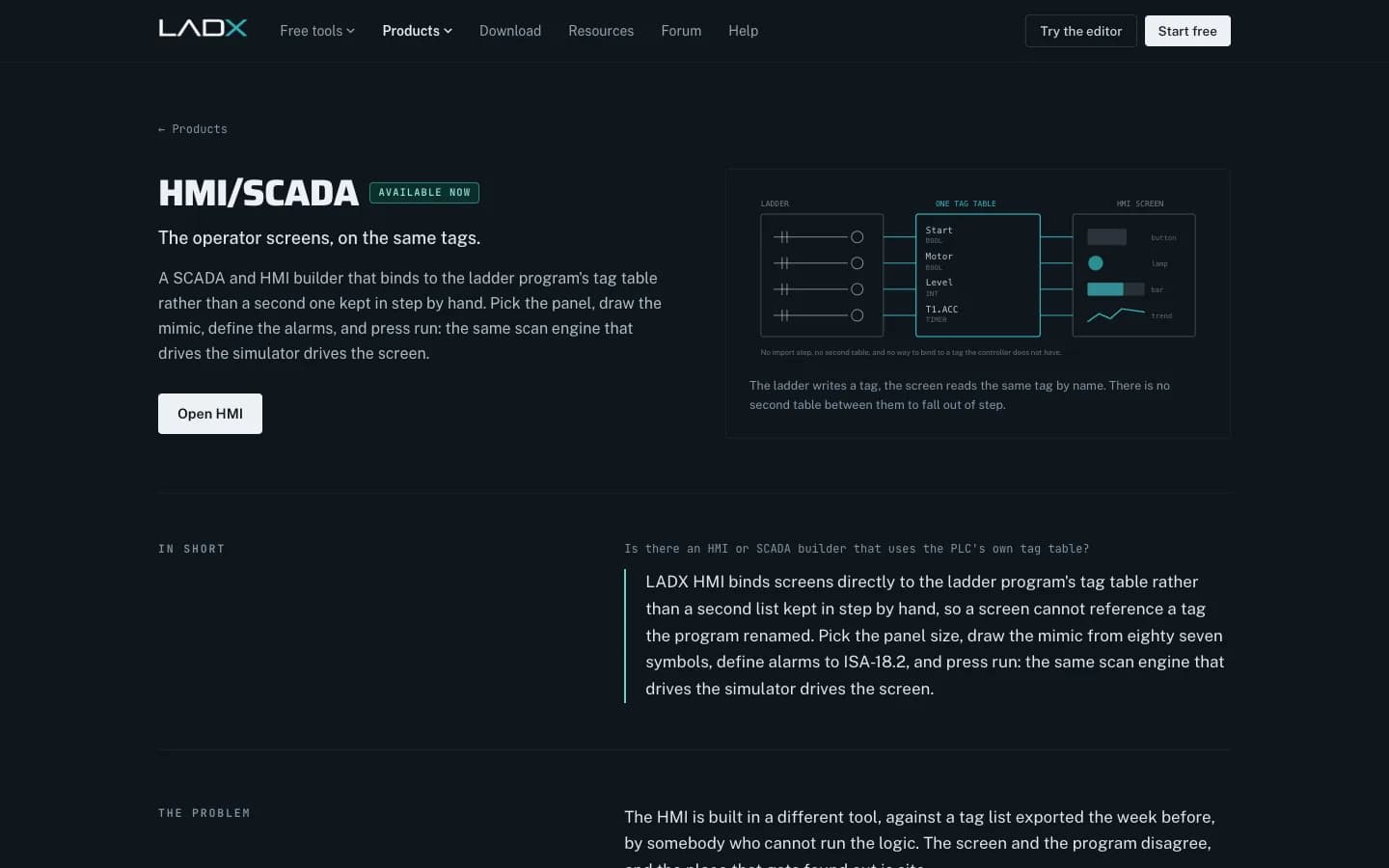
Good HMI screen design starts from the PLC program's own tag table, not from a spreadsheet exported three weeks earlier. LADX HMI/SCADA is built on that idea: operator screens bind to the ladder program's tags by name, and the same scan engine that runs the logic simulator runs the screen, so you can press a start button on the glass and watch the motor start in the logic.
This article explains what the tool does, how we would use it on a UAE project, and where it stops. LADX is the Wartens group's AI workbench for automation engineers, published at ladx.ai. Wartens does not sell it as a service in the UAE, but our engineers in automation engineering work the same way: screens are tested against the logic before anybody travels to site.
Why HMI screen design goes wrong on site
The usual pattern is familiar to anyone who has commissioned a line in Dubai Industrial City or a pumping skid in Mussafah. One engineer writes the PLC program. Another builds the HMI in a different package, against a tag export taken early in the job. The program changes: a tag is renamed, an interlock gains a bypass bit, a valve gets a second limit switch. The screen does not.
Nobody notices until the panel is powered up in front of the client. A lamp that never lights, a button that writes to a tag the controller no longer has, an alarm that floods the banner because nobody set a deadband. Each one is small. Together they eat the first two days of a site visit, and on an Abu Dhabi site with a permit-to-work system, two days is expensive.
What LADX HMI/SCADA does
LADX HMI/SCADA is a browser-based screen builder that sits on the same project as the ladder program. According to the product page, there is no import step and no second tag list. A screen cannot reference a tag the program has renamed, because the binding is by name to the tags that exist.
- The panel first. Fourteen real panel sizes, from a 4 inch 480 × 272 screen to a 21 inch 1920 × 1080 one. A graphic drawn for 15 inches and deployed on 7 inches gets cut off rather than scaled, so the glass is the first decision.
- Symbols. Eighty-seven vessels, pumps, valves, conveyors, instruments and switchgear symbols, in a flat ISA-101 style or a shaded realistic style. You can replace any symbol with your own SVG or a photograph of the actual machine.
- Alarms to ISA-18.2. A proper alarm state machine with unacknowledged, acknowledged, returned-unacknowledged, shelved, suppressed and out-of-service states, plus deadband and on-delay. Acknowledging never clears an active alarm.
- Bulk alarms. Pick forty analogue tags and generate hi, hi-hi, lo and lo-lo limits as a percentage of span, with a preview before anything is written.
- Recorded runs. Trends keep recording after you press Stop, and older samples are compacted to a minimum and a maximum per interval so a spike is not averaged away. Export is CSV.
HMI screen design step by step in LADX
- Start from the program. Open the project that holds the ladder logic. If the logic is still being written, draft it in the free LADX Ladder editor, which runs in the browser with no account or install.
- Choose the panel. Pick the resolution of the panel or industrial PC the client has specified. Changing it later means redrawing.
- Draw the overview first. Lay out the process mimic at overview level, then add detail screens for each unit. Bind every object to an existing tag.
- Define alarms in bulk. Generate analogue limits for the whole tag table, then rationalise the priorities with the process engineer rather than accepting the defaults.
- Press run. The ladder solves, HMI writes land at the top of the scan as they would on a controller, trends fill and alarms evaluate. Walk the operator through a start-up and a trip.
- Record and export. Save the run as evidence for the factory acceptance test, record the driver settings (OPC UA, Modbus TCP, EtherNet/IP or S7, with rack, slot, unit ID, poll rate and word order) and export the screens.
The export is one HTML file that carries the screens, the ladder program and the runtime. It opens and runs without an install or a network connection, so you can send it to a consultant in Abu Dhabi or hand it to an operator on a USB stick for review.
Design rules worth following
The tool will not design good screens for you. For that, start from ANSI/ISA-101.01-2015, the standard for human machine interfaces in process automation, which takes a lifecycle approach from design through continuous improvement. ISA's technical report TR101.01-2022 adds practical guidance on writing an HMI philosophy. For alarms, the ISA-18 series covers the alarm lifecycle from rationalisation to change management.
In practice our engineers keep a few rules. Use a muted grey background and save strong colour for abnormal states. Show values against their normal range, not as bare numbers. Keep navigation shallow: overview, unit, detail. Put the alarm banner in the same place on every screen. Agree the philosophy with the client before drawing anything, because changing a colour convention after 60 screens is a week of rework.
High-Performance HMI Design Basics
RealPars
This video is hosted on YouTube. Playing it loads content from Google, which may set cookies.
Watch on YouTubeWhat it does not do
LADX is clear about its limits, and so should we be. The runtime is the simulator, so it does not talk to plant equipment: driver settings are recorded for handover, not dialled. It does not produce a Siemens TP1500 or Rockwell PanelView project, which are closed formats. It is not a plant historian. Its scripting is a small expression language over tags, deliberately without functions or page access.
| Task | In LADX HMI/SCADA | Still in the vendor tool |
|---|---|---|
| Agree screen layout and navigation | Yes, against live simulated logic | No |
| Define and test alarms | Yes, ISA-18.2 states, deadband, on-delay | Final alarm configuration |
| Operator review before FAT | Yes, one HTML file, no install | No |
| Runtime on a vendor panel | No | WinCC, FactoryTalk View and similar |
| Live plant connection and history | No, settings recorded only | SCADA and historian |
Where it fits on a UAE project
We see it as a design and review tool. It is strongest early: agreeing screens with a client or consultant before the FAT, and proving that every button and lamp is wired to a real tag. For new panels built on industrial PCs or thin clients, the exported HTML runtime can be the screen. For a Siemens or Rockwell panel, the agreed design is rebuilt in the vendor package, and the tag names already match because they came from the program.
If you are replacing an old panel as part of a wider upgrade, read our guide to PLC and SCADA modernisation in the UAE. If you are still deciding whether you need a SCADA upgrade or something bigger, digital twin vs SCADA sets out the difference. Operators who will use the new screens can be trained through edWartens PLC and SCADA courses.
Next step: try the HMI builder at ladx.ai with one of your own programs. If you would rather have Wartens engineers design and test the screens and logic for a UAE plant, send the tag list and the P&IDs through contact and we will reply with a written scope.