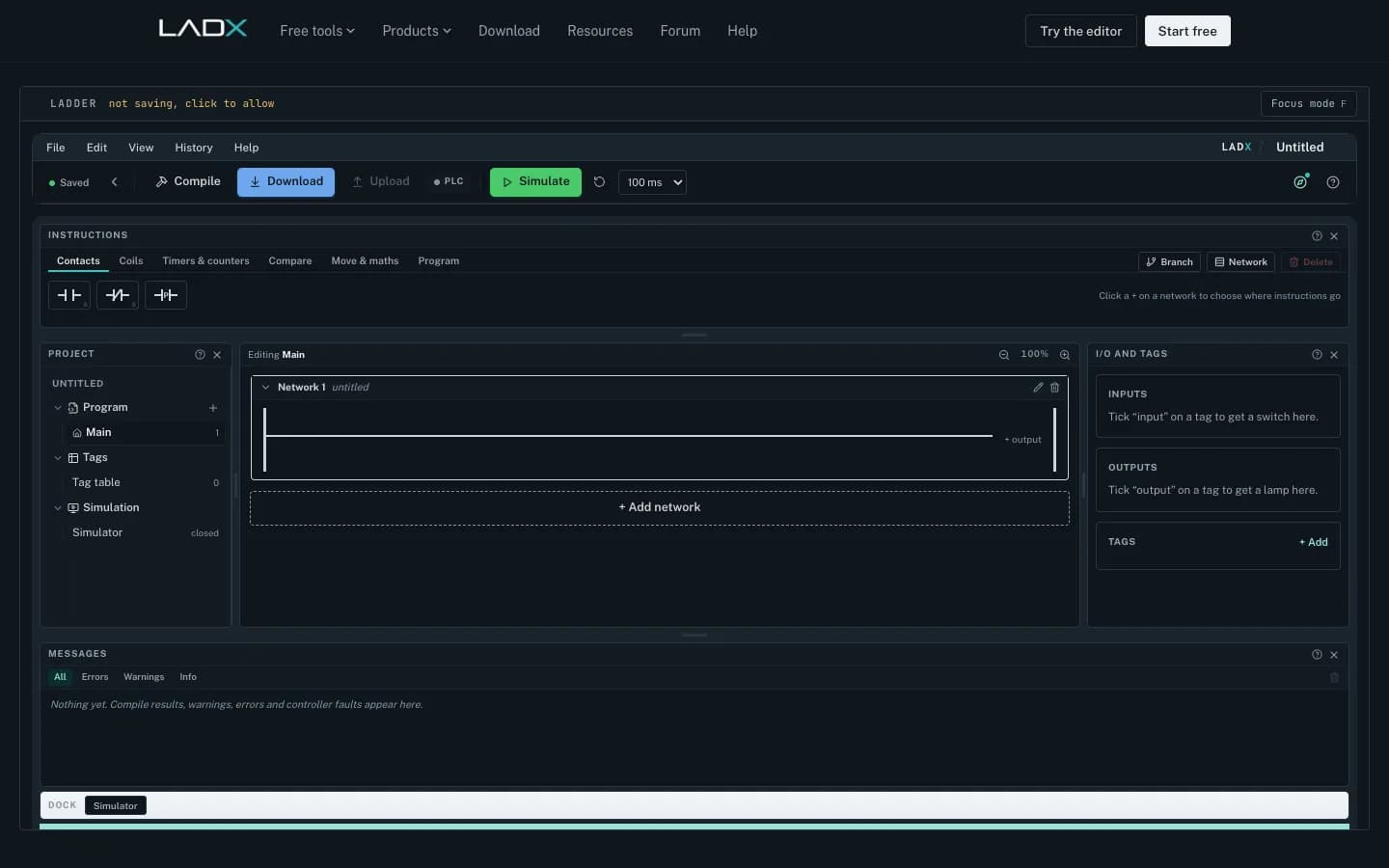
LADX Ladder is a free ladder logic simulator that runs in a web browser with no account, no license and no install, and it behaves like a PLC rather than a drawing: it keeps an output image, holds edge memory per instruction and runs timers on elapsed milliseconds. For maintenance technicians, apprentices and controls students in the U.S., that means you can practice the instructions you will meet in Studio 5000, such as XIC, XIO, OTE, TON and CTU, on a laptop at home. It is a learning and checking tool, not a replacement for time on a real controller.
Why a free simulator matters now
The Manufacturing Institute and Deloitte estimate U.S. manufacturers need as many as 3.8 million new employees by 2033, and that 1.9 million of those jobs could go unfilled if the skills and applicant gaps are not closed (The Manufacturing Institute). Every plant in that picture needs people who can read and troubleshoot ladder logic. Many learn on the job, through a registered apprenticeship (Apprenticeship.gov) or a community college program, and most of them do not have a PLC and a license at home.
What makes LADX Ladder behave like a PLC
Most teaching simulators solve rungs like a set of equations. That teaches the wrong mental model, and students then meet a real controller that does something their simulator never did. LADX Ladder is built on a real scan engine (LADX Ladder):
- An output image. A coil written on rung 12 reaches rung 13 in the same scan, but rung 4 only on the next one.
- Edge memory per instruction. A button held down counts once.
- Timers on elapsed milliseconds. Not on scan counts, so a timer runs the same however fast the scan is.
- Twenty-three instructions. XIC, XIO, OTE, OTL, OTU, ONS, TON, TOF, CTU, CTD, RES, the six comparisons, MOV, four arithmetic blocks and JSR, with addressable members such as .DN, .TT, .EN, .ACC and .PRE.
The mnemonics follow the Allen-Bradley style most U.S. plants use, so the habits carry straight over to Studio 5000. Every tag gets a plausible address and device type, which lets the simulator show a panel of real switches and lamps you can click.
Five exercises for your first week
- Seal-in motor start. Open the starter program, press Start, release it, and confirm the motor stays on. Then press Stop. The Stop button is modeled as normally closed, so it conducts at rest and breaks the rung when pressed. Explain why plants wire stop buttons that way.
- Break the seal-in on purpose. Move the Stop contact out of the latch branch and watch Stop fail. This is the mistake generated ladder makes most often, and LADX's AI box is built to flag it.
- Ten-second conveyor. Use a TON with a 10,000 ms preset. Watch .ACC climb and .DN set, then reset it with the input.
- Count parts. Add a CTU on a photo-eye input, a preset of 12 and a RES. Hold the photo-eye on and prove it counts once.
- Prove rung order. Put a contact that reads a coil above the rung that writes it, then below. Log the one-scan difference.
LADX also publishes a short explainer on what happens in one PLC scan that pairs well with exercise five. The four starter programs are copied when you open them, so a class can take them apart without spoiling them for the next person.
What is Ladder Logic?
RealPars
This video is hosted on YouTube. Playing it loads content from Google, which may set cookies.
Watch on YouTubeWhat it does not do
Know the edges before you build a course around it. LADX Ladder has no retentive timer (RTO), so you build one from a counter or a latch. It draws ladder only. Structured Text is handled by LADX Convert, not drawn here. It never connects to a physical controller, by design, and it is a teaching and verification simulator, not a certification tool. The AI box, which writes rungs from plain language, needs a free account. Without a key of your own it runs on free models through LADX's shared account, rate limited per account, and you can connect your own key to use paid models.
| Free option | Best for | Limit |
|---|---|---|
| LADX Ladder | Practicing ladder and scan behavior in a browser | No hardware, ladder only |
| OpenPLC Editor | Open-source IEC 61131-3 programs on low-cost hardware | Needs install and a target to run on |
| Vendor trial or lite software | Learning one brand's real IDE | License terms and hardware vary |
OpenPLC is a good companion once a learner wants to run code on cheap hardware: it is open-source and hardware-agnostic (OpenPLC by Autonomy). Use the browser simulator to build the mental model first, then move to real I/O.
Using it with a crew or a class
A maintenance supervisor does not need a lab to use this. Pick one real rung from your own line, such as the conveyor start with its guard interlock, and redraw it in the browser with the same tag names. Ask the new technician to predict what happens when the guard opens mid-cycle, then run it and compare. Ten minutes of predict-then-run teaches more than an hour of slides, because the simulator answers back.
For instructors, the useful habit is to grade the explanation, not the rung. A student who can say why a contact on rung 4 sees last scan's value has understood the scan cycle. The editor saves to the browser it runs in, so learners on shared lab PCs should not expect their work to follow them to another machine. Then, once the basics are solid, move them to a real controller and vendor software, where addressing, I/O configuration and online edits add the next layer of skill.
Next step
Open the editor at ladx.ai/ladder and start with the seal-in. Plants that want structured, hands-on practice can pair it with a virtual PLC and SCADA lab through our immersive training service. For controls teams adopting LADX across projects, see our industrial AI service, and for the next skill up, read how to test PLC logic without a PLC. Questions? Contact us.