PLC code conversion between platforms is never fully automatic, because timers, addressing and data types behave differently on each one. What a good tool can do is convert the logic that maps cleanly and tell you exactly what did not. LADX Convert takes a program drawn or saved in LADX and writes it out as IEC 61131-3 Structured Text, Siemens SCL, Rockwell neutral text or PLCopen XML, with a report on every element.
This matters more in India every year. Engineering for overseas clients is moving here: a report by the Indo-German Chamber of Commerce and ISG, covered by People Matters in October 2026, found capability centres set up in India by German mid-sized firms grew 108% in five years, with engineering mandates. A Bengaluru team can easily face a Siemens standard in one project and a Rockwell standard in the next.
Why PLC code conversion is hard
- Addressing. Siemens uses memory areas such as %I0.0. Older Allen-Bradley used files and slots. ControlLogix dropped both for named tags.
- Timers. An IEC TON is a function block instance with PT and ET. A Rockwell timer is a tag with .PRE, .ACC and .DN members. The behaviour when the rung goes false is where conversions go wrong.
- Data types and edges. INT, DINT and REAL ranges, and how one-shots are written, differ by vendor.
- Things around the logic. Hardware configuration, HMI tags, communications and safety programs do not convert with the rungs.
How LADX Convert works
There is no Siemens-to-Rockwell converter inside LADX. Every program is held in one intermediate representation built on PLCopen TC6, and each target format is written out of it. Because all four outputs come from the same source, they cannot drift apart. The conversion runs in your browser and nothing is uploaded, which matters when the code belongs to a client whose policy forbids cloud services.
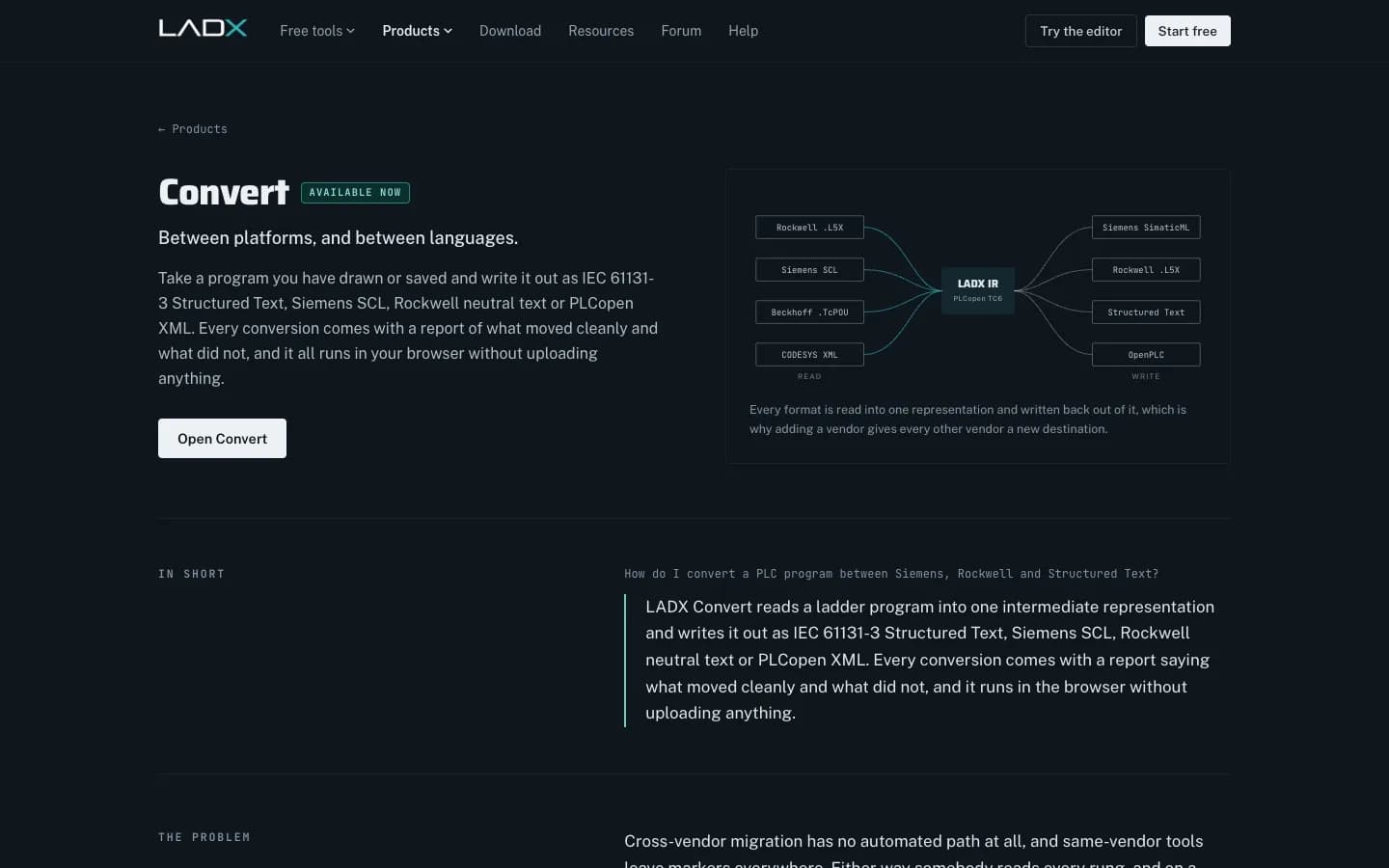
The report marks every element in one of three ways: converted cleanly, converted with a semantic difference worth reading, or needs a decision. Anything unmapped stays as an annotated placeholder, never silently dropped. Bridged rungs, where a wire crosses between parallel branches, have no series-parallel form, so they are refused and preserved rather than approximated.
What it does not do yet
Be clear about this with clients. According to LADX help, reading a vendor project file back in is not built yet: Convert opens LADX's own programs, and importing an L5X or a TIA archive is the next large item on the list. Whole-project formats such as .ACD and .ap1x are not read directly and need your own licensed vendor software. So today, Convert suits logic you build or rebuild in LADX and then deliver to several platforms, not a one-click migration of an existing plant program.
| Output format | Typical destination | Check after import |
|---|---|---|
| IEC 61131-3 Structured Text | CODESYS-based controllers, Beckhoff TwinCAT | Timer instances, data types |
| Siemens SCL | TIA Portal, S7-1200 and S7-1500 | Instance data for timers, addressing |
| Rockwell neutral text | Studio 5000 Logix Designer | Tag types, timer presets |
| PLCopen XML | Tools that import IEC 61131-10 | Vendor extensions, layout |
Take a simple example: a conveyor routine with a start/stop seal-in, a jam timer and a part counter. The seal-in converts cleanly to every target. The jam timer converts, but the report flags it, because an IEC TON instance and a Rockwell timer tag reset differently when the rung goes false, and someone must confirm which behaviour the machine needs. The counter converts with a note on data type, since the preset range depends on whether the target uses INT or DINT. Nothing in that routine is hard, yet each flag is a place where a silent automatic conversion could have produced code that compiles and behaves differently on the real conveyor.
PLCopen XML is the closest thing the industry has to a portable file. It became an international standard as IEC 61131-10:2019, the exchange format for programs written in the languages of IEC 61131-3.
PLCopen Introduction
PLCopen
This video is hosted on YouTube. Playing it loads content from Google, which may set cookies.
Watch on YouTubeA conversion workflow for export projects
- Agree the target and the standard. Platform, firmware, naming rules and any client library blocks, in writing, before logic is written.
- Build and test the logic once. Write it in LADX and run it on the scan-accurate simulator, forcing inputs through the awkward cases.
- Convert and read the report. Every item marked as a semantic difference or a decision gets a named engineer's answer.
- Import into the vendor tool. Open the output in TIA Portal or Studio 5000 Logix Designer with your licensed software and compile it there.
- Test on the vendor's simulator. For Siemens, S7-PLCSIM Advanced lets you test without hardware. Then run the client's FAT.
Where Wartens fits
LADX is the Wartens group's AI product for controls teams. Our Bengaluru engineering centre works across Siemens, Allen-Bradley, Mitsubishi, Delta, ABB and Schneider Electric platforms and handles migrations such as S7-300 to S7-1500 for Indian plants. See our automation engineering services and the questions to ask in choosing a PLC and SCADA system integrator.
Next step: try Convert on a small program at ladx.ai, or send us the target platform and a sample of your logic through the contact page for a written scope.